
Blog /
Where Should Your Analytics Agent Run Python?
SyneHQ
On this page
An analytics agent can write a pandas transformation in seconds. Deciding where that transformation should run takes more thought.
The answer determines which data leaves the warehouse, which packages are available, whether work survives a closed browser tab, and what happens when the code consumes too much memory. Those decisions shape the product as much as the model that wrote the code.
LangChain's guide to agent computers explains why agents need an execution environment to test their work. Analytics adds a useful constraint: much of the computation may already belong in the database. Start by deciding what should move, then choose where the remaining code runs.
First, see how much work SQL can finish
A request to explain refund patterns does not necessarily require moving every order into Python. Filter the relevant period, select necessary columns, and aggregate where the data already lives.
For example, this query uses an illustrative relation in which each row represents one order:
SELECT
  region,
  COUNT(*) AS orders,
  SUM(CASE WHEN is_refunded THEN 1 ELSE 0 END) AS refunded_orders
FROM analytics.orders
WHERE settled_at >= TIMESTAMP '2026-09-01 00:00:00'
  AND settled_at < TIMESTAMP '2026-09-08 00:00:00'
GROUP BY region
ORDER BY region;
Adapt the relation, timestamp type, timezone, and refund definition to your schema. If refunds are a separate one-to-many relation, establish the order grain before joining or the counts may inflate.
Python can calculate intervals or create a chart from the small regional result. It does not need the customer emails or the full order history for that task.
SQL still needs an execution budget. A compact result can come from an expensive scan. Check the query plan where appropriate and enforce timeouts independently of the number of rows returned.
Match the runtime to the remaining work
There are three common places to execute an analytics step:
| Execution location | Useful when | Questions to resolve |
|---|---|---|
| Warehouse SQL | Filtering, joins, and aggregates can run close to the source | Query cost, permissions, concurrency, supported SQL |
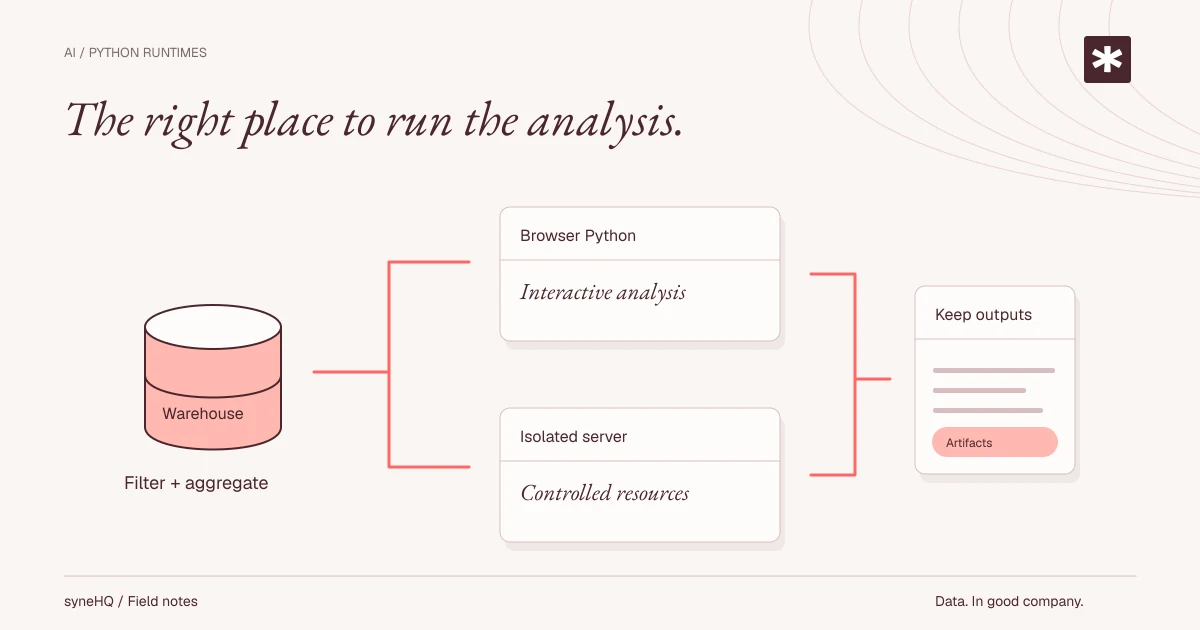
| Browser Python | Interactive work uses modest extracts and compatible packages | Browser memory, package compatibility, tab lifecycle, worker controls |
| Isolated server runtime | Work needs more resources, native packages, files, or background execution | Isolation, credentials, network access, quotas, cleanup, operating cost |
These can coexist in one investigation. Use SQL to reduce the data, Python for a calculation that benefits from it, and a separate artifact store for results the team needs to keep.
Avoid sizing the runtime from the compressed file alone. Parsing a CSV into a DataFrame, joining it, and making intermediate copies can require much more memory than the download size suggests. Measure peak memory with representative operations.
Browser Python makes the notebook interactive
Pyodide brings Python to WebAssembly in the browser. Its web worker guide describes running Python off the main browser thread so a long calculation does not block the interface.
That is useful for an interactive notebook: receive a bounded query result, reshape it with pandas, and show a chart without provisioning a separate server runtime for every session.
The boundary still needs deliberate design. A worker protects UI responsiveness; it is not an authorization system. Data passed into the runtime becomes available to the code running there. Browser-accessible APIs and any application bridge must expose only the operations that notebook code is allowed to use.
Check package compatibility before promising a workflow. A package built for ordinary server Python may depend on native libraries or operating-system capabilities unavailable in the browser environment.
Also define cancellation and persistence. A calculation that outlives its usefulness should be interruptible or terminable. A DataFrame that exists only in memory should not be presented as a durable result after the tab reloads. Saving notebook code and saving its generated data are different product behaviors.
Server execution moves the boundary
An isolated server runtime can support larger jobs, controlled package images, and work that continues after the user leaves the page. It also becomes an infrastructure service your team must operate or buy.
Treat generated code and its dependencies as untrusted. Evaluate the isolation mechanism against that workload, including its kernel boundary, filesystem mounts, network access, and exposure to neighboring sessions. A container or a microVM label alone does not describe the complete security configuration.
Give each run an authenticated owner and workspace. Enforce authorization when accepting work and when retrieving results. Keep production database credentials outside the runtime where possible: fetch an authorized, bounded dataset through a controlled service, or use a narrowly scoped connector that checks every request.
Set explicit CPU, memory, execution-time, disk, and concurrency limits. Decide what happens to partial outputs after cancellation or failure. A retry should not silently append duplicate results or repeat a previously completed external action.
For network access, list the destinations the task actually needs. Installing packages during a run is itself code execution and a reproducibility choice. Prefer reviewed, versioned environments for recurring analyses, then make package changes visible and testable.
Keep results beyond the runtime
An execution environment can be disposable while its useful outputs remain available.
For an investigation worth sharing, retain enough information to understand and rerun it:
- The question, metric definition, selected connection, and query parameters.
- SQL and Python source, with their execution order.
- Runtime and package versions, plus random seeds where relevant.
- Input provenance and retrieval time; retain a controlled snapshot when policy permits and exact reproduction requires it.
- Output artifacts, execution status, and any review decisions.
Mutable warehouse data complicates reproduction. Recording SQL and a timestamp explains how a result was produced, but it does not recreate rows that have since changed. Be explicit about whether a rerun uses fresh data or a retained snapshot.
An agent also does not need every byte of every output in its next prompt. Return summaries, schema information, and bounded samples to the model. Keep larger tables and charts available to the person inspecting the notebook.
Run a small acceptance exercise
Before choosing a runtime, test the same representative analysis in the environments you are considering. Measure cold start, completion time, peak memory, and the effort required to reproduce the result.
Then test the less convenient cases: cancellation during a join, a missing package, a lost browser connection, a rejected network request, and an attempt to retrieve another workspace's artifact. Define the expected behavior first.
This is also where to check freshness in the interface. If a new execution fails, a previous chart must not appear to be the successful output of that failed run. Keep its provenance visible or mark it as stale.
In Quantum Lab, SQL, Python, tables, and charts form an ordered notebook. Its documented browser Python workflow and SQL connection have separate execution boundaries. Use that distinction when deciding what data to retrieve and what code to run; evaluate server execution as a separate architecture choice when your workload requires it.
Choose the smallest environment that can complete the analysis within the required data, resource, and lifecycle boundaries. Expand it when a measured workload needs more capability.
Put it to work
Bring the next question into your workflow.
See how Kole brings questions, source data, and review into a shared workflow.